Remotewize
Wrike logo

Wrike

4.8
Starting at FreeTrial available

Wrike is a cloud-based project management and work collaboration platform designed to help teams plan, track, and execute projects in one place. It serves a broad range of users, from mid-sized teams to large...

Last updated: July 28, 2026

What is Wrike?

Wrike is a cloud-based project management and work collaboration platform designed to help teams plan, track, and execute projects in one place. It serves a broad range of users, from mid-sized teams to large enterprises, including marketing departments, professional services firms, and creative agencies that need to coordinate complex workflows across multiple stakeholders.Wrike is frequently praised for its flexible project views, detailed reporting, and strong customization options that suit complex team structures. However, reviewers consistently note that its depth of features creates a steep learning curve, and its pricing is considered high compared to alternatives, making it less accessible for smaller teams or organizations with tighter budgets.
Overall Rating

Based on 2 ratings

All Reviews →
4.8
4.8

Wrike Core Ratings

Feature depth9.2
Ease of use8.4
Value for money7.7
Customer support7.8

Starting Price

Free

View pricing page →

Pros

AI agents reduce distributed team workload

Cross-functional visibility across remote projects

Real-time resource allocation across dispersed teams

Automated workflows standardize remote team processes

Built-in proofing keeps async reviews centralized

Cons

Enterprise pricing strains smaller distributed teams

Steep configuration complexity for new admins

Steep learning curve and overwhelming interface for new and large teams

Product gallery

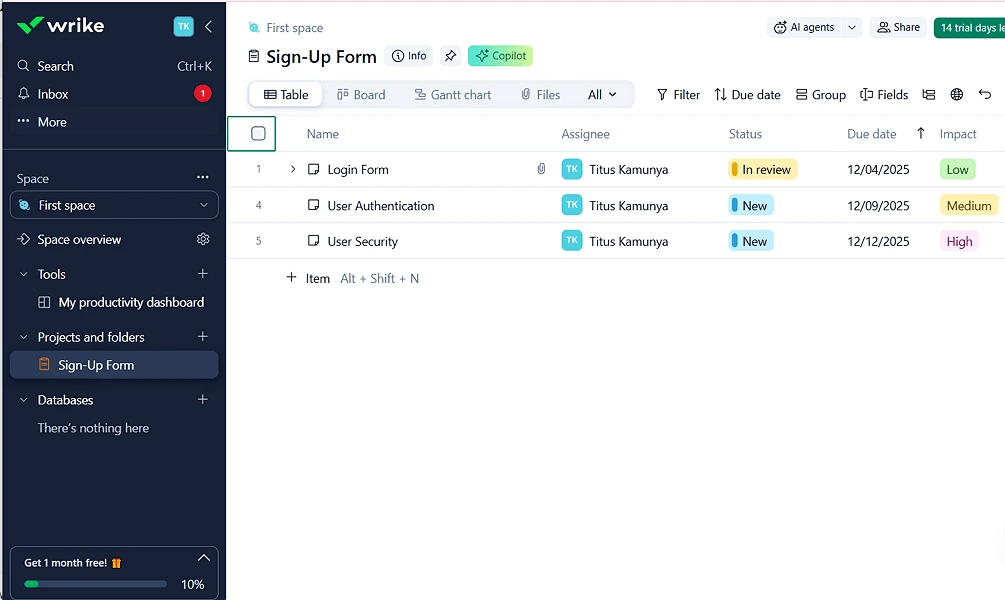
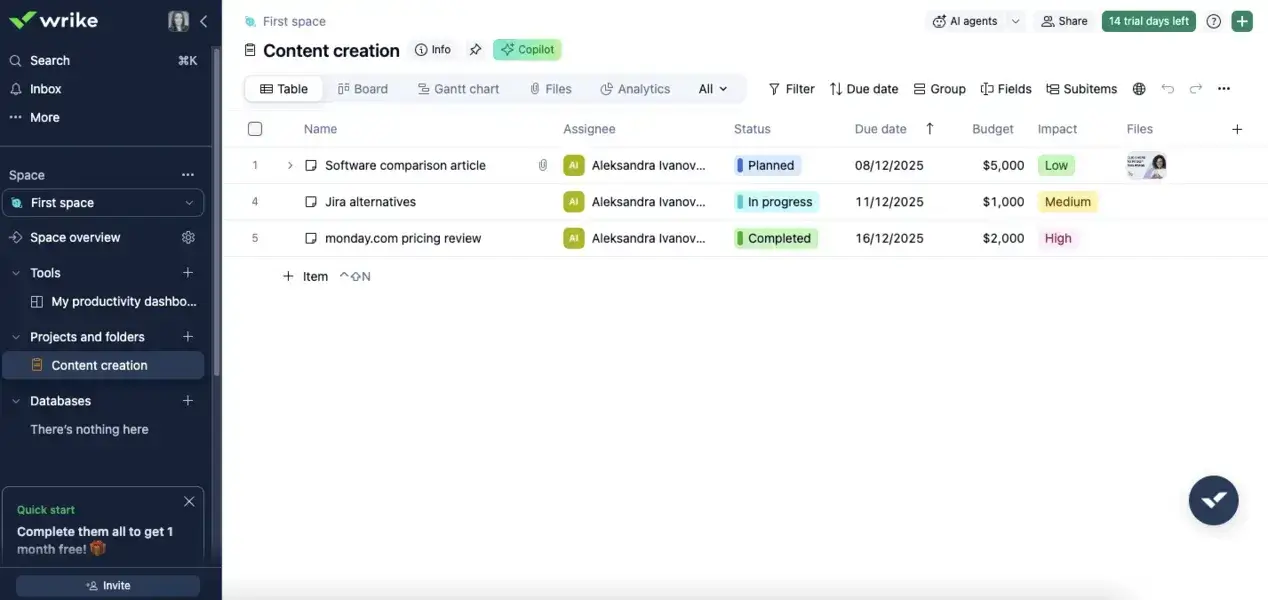
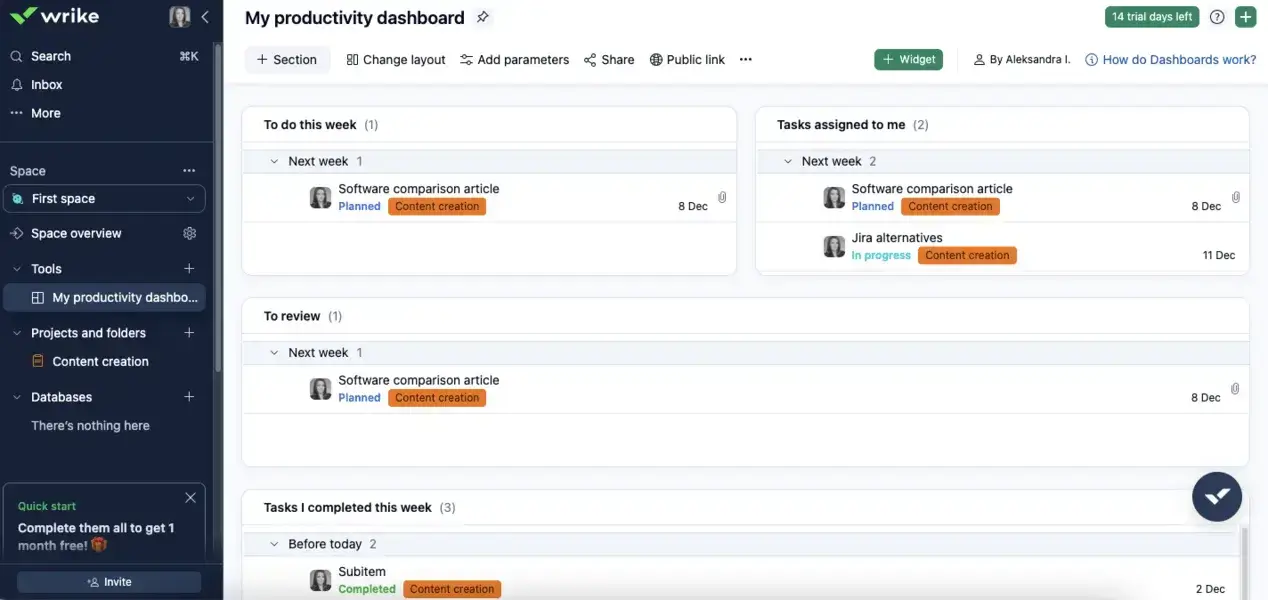
Wrike Web/Desktop screenshot 1Wrike Web/Desktop screenshot 2Wrike Web/Desktop screenshot 3

Who is Wrike For?

Wrike is best suited for growing businesses, mid-sized organizations, and enterprises that need advanced project management, cross-functional collaboration, resource planning, and workflow automation.

Why Choose Wrike?

Choose Wrike if you're leading a distributed team of 20 or more across multiple functions — operations, marketing, product, or professional services — where work spans departments and accountability gaps are costing you delivery speed. Its core differentiator is the combination of structured project governance with native AI agents and Copilot, giving managers real oversight without micromanagement.For distributed team leaders, Wrike eliminates the coordination overhead that kills async productivity: fragmented approvals, unclear ownership, and invisible bottlenecks. Resource management, Gantt charts, and AI-driven insights give you a live read on capacity and risk across every project. Reviewers on G2 consistently cite visibility and cross-team alignment as standout strengths. If you need enterprise-grade control without sacrificing team agility, Wrike is the platform built for that exact tension.

Date generated: July 27, 2026

What Real Users Think About Wrike

Verdict

Wrike is a strong contender this week if you need structured, cross‑team visibility, flexible workflows, and automation at scale—and you can assign someone to own configuration, training, and reporting. If your priority is fast, low‑maintenance adoption, simple reporting, or mobile‑first execution for a broad user base, you’re likely better served by a lighter PM tool and should treat Wrike as the heavier, more configurable option in your shortlist.

What Users Love

  • Cross‑team visibility that replaces status meetings: Collaboration is Wrike’s core win: reviewers consistently describe moving from

    obscurity” to shared visibility where dashboards, Gantt charts, task comments, and @mentions replace status meetings and email threads, which is vital if you’re coordinating several teams or clients at once.…

  • Deeply customizable workflows for complex operations: Teams with complex workflows value being able to model their real processes—legal flight stages, publishing proof cycles, SEO workflows, or multi‑brand creative pipelines—using custom statuses, request forms, spaces, and blueprints…

    Wrike offers a wide range of project management features and can be highly customizable for teams with complex workflows.

  • Automation and AI that reduce manual work and spark ideas: Automation and the newer AI features are repeatedly praised for cutting manual follow‑ups, assigning work, updating statuses, and even helping brainstorm content, which matters if you’re running high‑volume operations and…

    Wrike's new AI features allow for multiple processes being completed at once through single prompt.

  • Scalable spaces and blueprints for multi‑team collaboration: Wrike scales well across locations and departments: teams create separate spaces and blueprints for different offices, yet still share templates and collaborate in a single environment, which is valuable if…

    The best feature of Wrike is that we can create unlimited spaces for different offices/HQs, and all teams can still work together using the same blueprints/templates.

  • Built‑in capacity and time tracking for resource‑heavy teams: Compared with many PM tools, Wrike’s workload views, capacity planning, and time tracking are unusually integrated into everyday dashboards, which helps teams bill clients, monitor fatigue, and balance work across…

    The capacity and workload management feature is important as it helps us during our weekly stand-ups to see what's on everyone's plate, making it easy to know who is available…

What Users Dislike

  • Steep learning curve and overwhelming interface for new and large teams: The single biggest practical risk is that Wrike’s richness makes onboarding and day‑to‑day navigation feel overwhelming for many users; learning‑curve and usability complaints surface 16 times and negative ease‑of‑use sentiment…

    The platform includes many features, but that can also make it feel overwhelming at first.

  • Reporting power comes with configuration overhead and messy UX: Reporting is frequently described as powerful but messy, unintuitive, or too reliant on custom fields and configuration, reflected in 64 mentions (35 positive, 14 negative) and 22 complaint mentions overall.…

    Reports are still quite messy. I'd like a way to organize them rather than just having 100 of them that I can't really sort or organize into folders or any…

  • Search, views, and cross‑project discovery feel clunky: Finding past projects, tasks, and comments is a recurring pain point: reviewers complain that search results are unintuitive, older work is hard to locate without IDs, and some key views…

    It's sometimes hard or difficult to find previous projects unless you know the reference or project number.

Metric-backed themes

Recurring topics from processed review analysis — not AI guesses.

Collaboration×114Automation×70Ease of use×56Reporting×64Onboarding×55AI assistant×40Reporting×22Learning curve×16

Best for

Mid‑market and enterprise teams in marketing, operations, IT/implementation, and real‑estate or publishing that juggle many concurrent projects, need structured cross‑team visibility, and are willing to invest in onboarding and admin to exploit custom workflows, request forms, automations, and AI. It also suits small businesses with multi‑stakeholder work (agencies, creative teams) that value dashboards, workload views, and centralized intake more than a shallow learning curve or rock-bottom pricing.

Avoid if

You want a lightweight, mostly self-explanatory tool that a broad team can adopt in a week, rely heavily on mobile for managing projects, or need very simple, out-of-the-box reporting and calendar/list views with minimal configuration. Wrike is also a poor fit if your budget cannot stretch to higher tiers or you’re unwilling to dedicate an owner to tame its customization, manage feature churn, and shield casual users from its complexity.

Wrike Benefits and Features

Wrike lets you display the same project data across multiple formats — Gantt charts, Kanban boards, list views, and calendars — without duplicating any work. Each view pulls from a single source of truth, so switching perspectives never creates inconsistency across your team's tasks.As a manager, you choose which view best suits your current decision-making need. Reviewing timelines before a client deadline? Switch to Gantt. Checking task status across departments? A board view gives you that at a glance without digging through reports.For distributed teams operating across time zones, this flexibility means you're never waiting on a status call to understand where things stand. You can monitor progress in the format that makes sense to you, while your team works in whatever view suits their workflow.

Wrike AI Features

Wrike AI agents are intelligent assistants that actively monitor your projects, analyze context, and take defined actions — such as flagging at-risk tasks, categorizing incoming requests, or validating form submissions before they reach your team.You can deploy prebuilt agents for common scenarios or configure custom agents tailored to your specific workflows. Rather than waiting for problems to surface in a status meeting, you set agents to surface risks automatically and alert the right people immediately.For managers overseeing complex, distributed operations, this shifts your role from reactive firefighting to proactive oversight. Agents handle the monitoring work that would otherwise require constant manual attention, freeing you to focus on decisions that actually require human judgment.

How Much Does Wrike Cost

Free plan

A vendor-defined tier for teams comparing cost, limits, and fit.

$0

Try for free

It includes:

  • Board view
  • AI Essentials
  • Project & task management
  • Web
  • desktop
  • and mobile apps

Team

A vendor-defined tier for teams comparing cost, limits, and fit.

$10

Per user, per month

Try for free

It includes:

  • All features on free plan
  • plus
  • 2-15 users
  • Unlimited free viewers
  • Cross-tagging
  • 2 GB storage per user

Business

A vendor-defined tier for teams comparing cost, limits, and fit.

$25

Per user, per month

Try for free

It includes:

  • All features on team plan
  • plus
  • 5-200 users
  • Custom item types
  • User groups & permissions
  • Automations (200 actions/user/month)

Wrike Integrations

Microsoft TeamsZoomGoogle DriveMiroSkyvia

Technical Details

Deployment

  • cloud

Device supported

  • windows
  • macos
  • android
  • ios
  • web
  • chrome-extension

Language supported

  • English
  • French
  • German
  • Italian
  • Japanese
  • Portuguese
  • Spanish

Customer Support

  • Live chat
  • Phone
  • Email
  • Ticket
  • Community
  • Social media
  • Help center
  • AI-assisted chat

Security and Compliance

  • Encryption at rest
  • Encryption in transit
  • GDPR Compliance
  • HIPAA Compliance
  • SOC 2 Type II
  • ISO 27001
  • Role-Based Access Control (RBAC)
  • Multi-Factor Authentication (MFA)
  • Single Sign-On (SSO)
  • Disaster recovery plan
  • Audit logs

Wrike Reviews

We are still refining the full reviews experience. For now, use the overview ratings card above for the product's rating snapshot.

JS

Jayle S.

Marketing, 11-50 employees

Less than a year

5.0

July 2026

Wrike has significantly improved product visbility across our teams.

Pros

Wrike has helped us improve project organization and access to information. It makes it easier for team members to access information relevant to their roles.

Cons

Wrike usually feels overwhelming at first for our new employees, simply because of its broad set of features.

Write a review

Wrike FAQs

What is Wrike used for?+

Wrike is a work management platform that helps teams plan projects, manage tasks, automate workflows, allocate resources, and track project progress from a centralized workspace.

Is Wrike free?+

Yes. Wrike offers a free plan with basic task management and collaboration features. Teams that need advanced project planning, reporting, automation, and resource management must upgrade to a paid plan.

Is Wrike good for remote teams?+

Yes. Wrike is well-suited for remote and hybrid teams because it centralizes project communication, task tracking, file sharing, approvals, and reporting on a single platform.

How much does Wrike cost?+

Wrike offers multiple pricing plans, including a free plan and several paid tiers with increasing access to automation, resource management, analytics, security, and customization features.

Does Wrike have Gantt charts?+

Yes. Wrike includes interactive Gantt charts that allow teams to visualize project timelines, manage dependencies, adjust schedules, and monitor project progress.

Does Wrike offer resource management tools?+

Yes. Wrike provides resource allocation, workload management, capacity planning, and team utilization tools that help managers balance workloads and avoid employee burnout.

Is Wrike easy to use?+

Wrike offers a powerful feature set but can have a steeper learning curve than simpler project management tools. Teams often benefit from initial setup and workflow customization.

Does Wrike support Agile project management?+

Yes. Wrike supports Agile methodologies through Kanban boards, sprint planning, backlog management, custom workflows, and project tracking tools.

Is Wrike secure?+

Yes. Wrike provides enterprise-grade security features, including data encryption, role-based permissions, audit logs, two-factor authentication (2FA), and single sign-on (SSO) on eligible plans.

What are Wrike's biggest advantages?+

Wrike's biggest strengths are its robust resource management, advanced reporting, workflow automation, project visibility, proofing and approval tools, and ability to handle complex projects across large, distributed teams.